[3301] Index_Industry_Sectro Chart_0.9 PDF
1. Overview of Screen
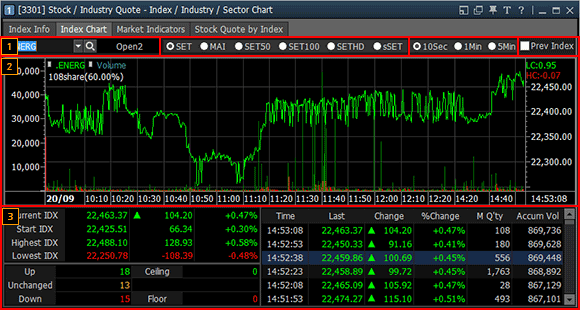
This screen views current index, up/down stocks and hourly index status of industries that represent an index
like "SET, MAI, SET50, SET100, SETHD, sSET" using a "10-second/1-minute/5-minute" chart to identify flow of
industrial index at a sight.
2. Description of Screen
Selection Window

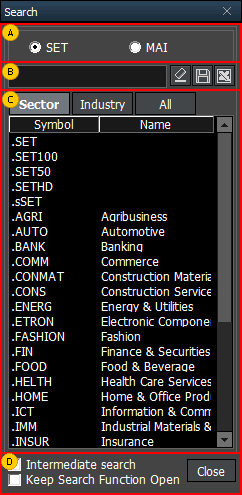
Directly select a market to view among "SET, MAI, SET50, SET100, SETHD, sSET" or click  button to select a market
and search an industry.
button to select a market
and search an industry.
button to select a market
and search an industry.
Select a market to view
A stock can be viewed by industry code and stock name.
Stocks are viewed.
If ‘Intermediate search’ is checked, intermediate search of the stock can be viewed. If "Keep
Search Function Open" is checked, the ‘Search’ pop-up window is kept instead of disappearing after double
clicking and entering industry.
Select data to be viewed among "10Sec, 1Min, 5Min".
Select Prev Index to identify flow of industrial index of the previous day.
Industry chart of the selected time unit can be viewed.
Current index status, up/down stocks and hourly index trend of the selected industry can be
viewed
