[9001] Customer Transaction Report PDF
1. Overview of Screen
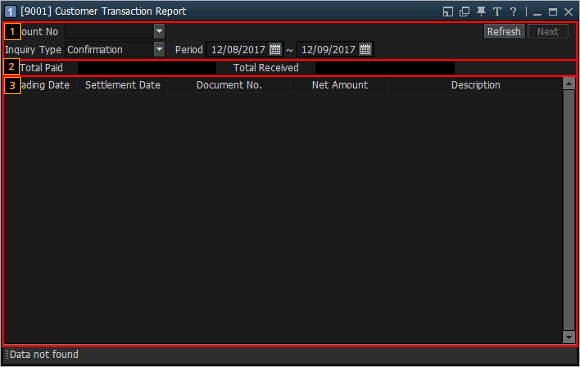
This is a screen to view details of transactions that satisfy the designated payment conditions.
2. Description of Screen
Select an account number to view transactions
Designate Inquiry Type and Period, and click  button
Confirmation Screen: Summary of buy/sell orders submissions.
Stock Trading: Shows buy/sell orders submissions are matched.
Stock Movement: Shows stocks movement.
Port Outstanding
Monthly Interest
Realized Gain/Loss Detail
Order Transaction by Period: List of Buy/Sell and Cancel orders submissions.
Realized Gain/Loss by Stock: Summary of realized gain/loss by stocks.
Daily Realized G/L
Stock Transfer
Deposit/Withdraw
‘Total Paid and Total Received’ that satisfy the conditions set in  are shown.
History of transactions that satisfy the payment conditions set in is provided.
is provided.『Description of Terms』
Commission: Match amount * commission rate (differs among accounts: 0.15%)
Total Paid: This indicates (net buy amount – net sell amount) if net buy amount is larger than net sell amount.
Total Received: This indicates (net sell amount – net buy amount) if net sell amount is larger than net buy amount
